
Pi-hole is a network-wide ad blocker that acts as a DNS sinkhole to block ads and tracking on all devices in a network. Pi-hole works at DNS level and can be installed on a small computer such as the Raspberry Pi or another Linux server.
The problem: False positives with other family members
If you use the official blocklists, there should only be a few false positives. However, if you use more blocklists for Pihole, it can quickly happen that some websites do not work properly or are not accessible at all. As a Pihole admin, you just whitelist the domain, while the other people in the household who use Pihole have to wait until the admin has done this for them. Fortunately, there is a solution for this:
Pihole Simple Whitelist
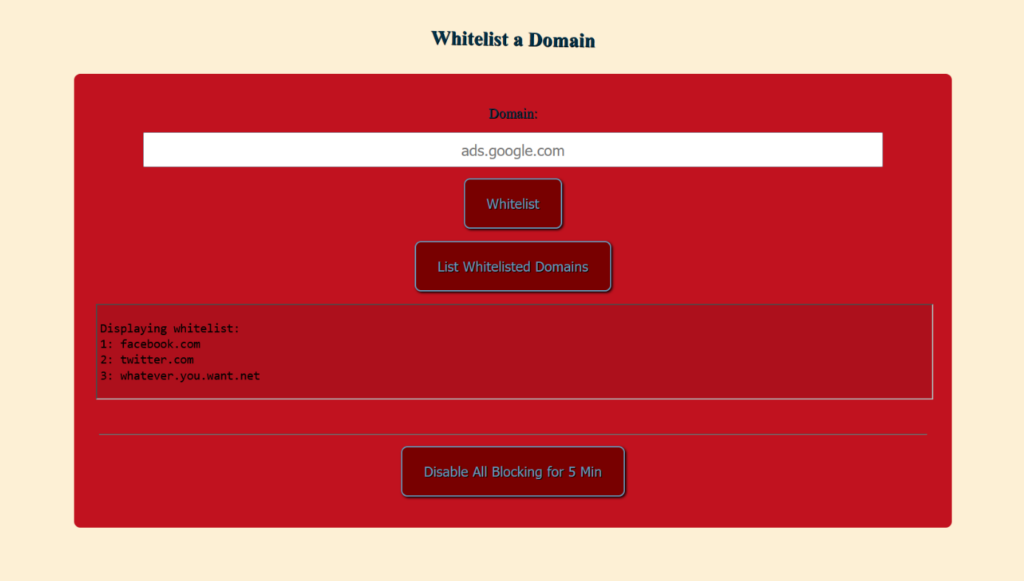
Install Pihole Simple Whitelist
sudo sucd /var/www/html/mkdir whitelistcd whitelistcurl -O https://raw.githubusercontent.com/zigzag1001/pihole-Simple-Whitelist/main/whitelist-add.php \
-O https://raw.githubusercontent.com/zigzag1001/pihole-Simple-Whitelist/main/style.css \
-O https://raw.githubusercontent.com/zigzag1001/pihole-Simple-Whitelist/main/index.htmlDetermine and copy the hash value of your Pihole Webui password:
cat /etc/pihole/setupVars.conf | grep WEBPASSWORDSet $auth in line 16 to the password hash.
nano whitelist-add.php<?php
if ($_SERVER['REQUEST_METHOD'] == 'POST') {
if (isset($_POST['action']) && $_POST['action'] === 'list') {
// List whitelisted domains
$command = "sudo pihole -w -l | awk '{print $1, $2}'";
$output = [];
exec("$command 2>&1", $output);
echo "<pre>" . implode("\n", $output) . "</pre>";
} elseif (isset($_POST['action']) && $_POST['action'] === 'disable') {
// https://www.crosstalksolutions.com/the-worlds-greatest-pi-hole-and-unbound-tutorial-2023/
$XMin = 5; // Minutes to disable blocking
$XSec = $XMin * 60;
$auth = "YOUR_PASSWORD_HASH"; // `cat /etc/pihole/setupVars.conf | grep WEBPASSWORD`
$command = "curl -s \"http://localhost/admin/api.php?disable={$XSec}&auth={$auth}\"";
$output = [];
$returnVar = 0;
exec("$command 2>&1", $output, $returnVar);
if ($returnVar === 0) {
echo "Disabled blocking for $XMin minutes. ". implode(' ', $output);
$t=time();
$d=date("M-d H:i e",$t);
error_log("Disabled by {$_SERVER['REMOTE_ADDR']} - {$d}\n", 3, "/var/log/pihole_disabled.log");
} else {
echo "Failed. Blocking not disabled. Output: " . implode(' ', $output);
}
} else {
// Whitelist a domain
$t=time();
$d=date("M-d H:i e",$t);
$domain = escapeshellarg($_POST['domain']);
$regex_domain = "/[a-zA-Z0-9-]+(\.[a-zA-Z0-9-]+)*\.[a-zA-Z]{2,6}/";
$is_match = preg_match($regex_domain, $domain);
if ($is_match == 1) {
$command = "sudo pihole -w $domain --comment \"{$_SERVER['REMOTE_ADDR']} - {$d}\"";
$output = [];
$returnVar = 0;
exec("$command 2>&1", $output, $returnVar);
if ($returnVar === 0) {
echo "Domain $domain has been successfully whitelisted.";
} else {
echo "Failed to whitelist domain $domain. Output: " . implode(' ', $output);
}
} else {
echo "Domain input is wrong.";
}
}
}
?>Save: CTRL + O and Close: CTRL + X
Now you can access http://pi.hole/whitelist/ in your browser.
Pihole: Simple Whitelist is a project by zigzag1001 on Github.