
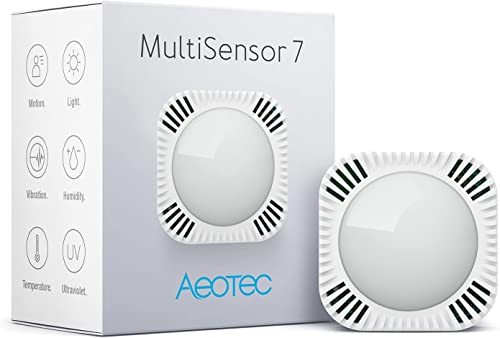
Sechs Sensoren in einem Gehäuse, Z-Wave 700 mit S2-Verschlüsselung.
Kompatibel mit Home Assistant, Z-Wave JS, Home Assistant Z-Wave, Hubitat, Homey und openHAB. Teilweise unterstützt: Domoticz.
- Hersteller
- Aeotec
- Modell
- ZWA024
- Modell-ID
- ZWA024-C
- Stromversorgung
- Batterie (ER14250 oder USB)
- Rolle
- Endgerät
Wo kaufen
AEOTEC
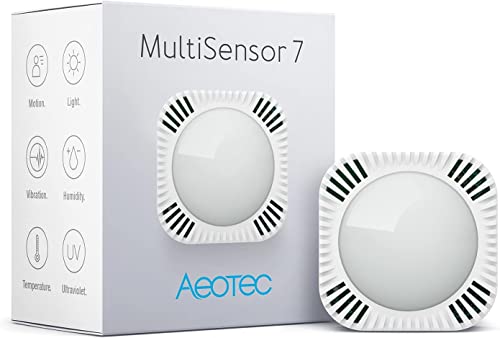
Aeotec ZWA024-C Bewegungs-/Präsenzmelder mit Temperatur, Luftfeuchtigkeit, Helligkeit, UV-Index und Vibration
2 Angebote
| Shop | Angebot | Preis | Versand | Lieferzeit | Zum Shop |
|---|---|---|---|---|---|

|
Aeotec Multi-Sensor 7 | Z-Wave Smart Home 6-in1 Sensor | Bewegungsmelder, Temperatur, Luftfeuchtigkeit, Helligkeit, UV-Index, Vibration | ZWA024-C | Preis nicht aktuell | Auf Lager | Aktuellen Preis ansehen bei Amazon.de | |

|
Aeotec MultiSensor 7 | 68,29 € | Versand 4,99 € Gesamt 73,28 € | 2-4 Days | Zum Angebot bei Proshop.de |
Anzeige * Affiliate-Link: Kaufst du über diesen Link, erhalten wir eine Provision. Für dich entstehen keine Mehrkosten.
Preise inkl. MwSt., zzgl. Versandkosten. Stand: Oktober 31, 2026, 2:31 a.m.. Preise und Verfügbarkeit können sich geändert haben.
Als Amazon-Partner verdiene ich an qualifizierten Verkäufen.
Läuft wahlweise mit Batterie oder per USB. Am USB-Netzteil bleibt der Sensor wach, wodurch sich Parameter deutlich schneller ändern lassen.
Kompatibilität
WLAN
| Integration | Status | Seit | Hinweise |
|---|---|---|---|
| Home Assistant | Läuft | — | über Z-Wave JS und Home Assistant Z-Wave |
Z-Wave
| Integration | Status | Seit | Hinweise |
|---|---|---|---|
| ZJS Z-Wave JS | Läuft | 8.0.0 |
— |
| Home Assistant Z-Wave | Läuft | — | — |
Zigbee
| Integration | Status | Seit | Hinweise |
|---|---|---|---|
| HE Hubitat | Läuft | — | — |
| HMY Homey | Läuft | — | — |
| openHAB | Läuft | — | — |
| DOM Domoticz | Teilweise | — | — |
Etwas falsch oder unvollständig? Erfahrung melden
Einrichtung & Anlernen
- Go to Settings → Devices & services → Add integration and search for Aeotec.
- Follow the config flow – devices on the same network are usually discovered automatically.
- Open Z-Wave JS UI → Control panel → Manage nodes → Include (use S2 when the device supports it).
- Put Aeotec MultiSensor 7 into inclusion mode: Aktionstaste einmal drücken, während der Controller im Inklusionsmodus ist (S2 mit DSK-PIN).
- For S2 enter the five digit DSK PIN from the device label.
- Wake up battery devices until the interview is complete.
- Go to Settings → Devices & services → Z-Wave → Add device.
- Put Aeotec MultiSensor 7 into inclusion mode: Aktionstaste einmal drücken, während der Controller im Inklusionsmodus ist (S2 mit DSK-PIN).
- Enter the DSK PIN for S2 secure inclusion when asked.
- Open Devices → Add device → Zigbee/Z-Wave and start the discovery.
- Put Aeotec MultiSensor 7 into pairing mode: Aktionstaste einmal drücken, während der Controller im Inklusionsmodus ist (S2 mit DSK-PIN).
- Assign the matching built-in or community driver and click Configure.
- Install the app of the manufacturer from the Homey App Store.
- Add the device via Devices → + → Aeotec.
- Put Aeotec MultiSensor 7 into pairing mode: Aktionstaste einmal drücken, während der Controller im Inklusionsmodus ist (S2 mit DSK-PIN).
- Install the matching binding and open Settings → Things → +.
- Start the discovery scan and put Aeotec MultiSensor 7 into pairing mode: Aktionstaste einmal drücken, während der Controller im Inklusionsmodus ist (S2 mit DSK-PIN).
- Link the channels of the new Thing to items.
- Open the matching hardware plugin and start the inclusion.
- Put Aeotec MultiSensor 7 into pairing mode: Aktionstaste einmal drücken, während der Controller im Inklusionsmodus ist (S2 mit DSK-PIN).
Alternativen
Dieselbe Aufgabe von anderen Herstellern – Geräte desselben Typs und Funkstandards, die ebenfalls mit Home Assistant laufen.