
Zurück zur Übersicht
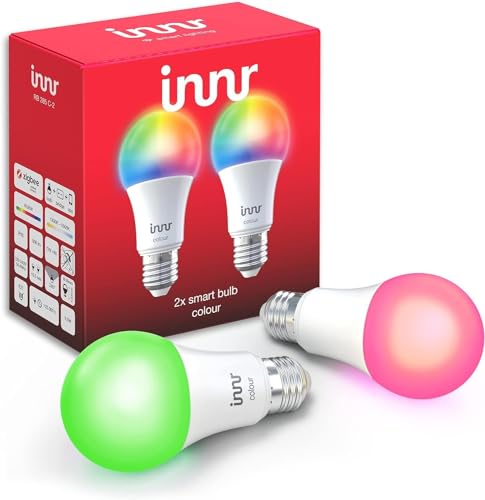
Zigbee-LED-Lampe mit Farbsteuerung von Innr. Kompatibel mit Home Assistant über Zigbee2MQTT, deCONZ, ZHA oder Tasmota. Läuft außerdem mit ioBroker und Domoticz.
Kompatible Systeme
ZHAdCZDOM
Kompatibel mit Home Assistant, Zigbee2MQTT, ZHA, deCONZ / Phoscon, Tasmota, ioBroker und Domoticz.
- Hersteller
- Innr
- Modell
- RB 285 C
- Modell-ID
- RB 285 C
Kompatibilität
WLAN
| Integration | Status | Seit | Hinweise |
|---|---|---|---|
| Home Assistant | Läuft | — | über ZHA, Zigbee2MQTT, deCONZ / Phoscon und Tasmota |
Zigbee
| Integration | Status | Seit | Hinweise |
|---|---|---|---|
| Zigbee2MQTT | Läuft | — | — |
| ZHA ZHA | Läuft | — | — |
| dCZ deCONZ / Phoscon | Läuft | — | — |
| Tasmota | Läuft | — | — |
| ioBroker | Läuft | — | — |
| DOM Domoticz | Läuft | — | — |
Etwas falsch oder unvollständig? Erfahrung melden
Einrichtung & Anlernen
- Go to Settings → Devices & services → Add integration and search for Innr.
- Follow the config flow – devices on the same network are usually discovered automatically.
- Open Zigbee2MQTT → Settings → Permit join (or enable joining for a specific coordinator/router).
- Put Innr RB 285 C LED-Lampe mit Farbsteuerung into pairing mode: den Reset laut Bedienungsanleitung durchführen (meist die Taste etwa 5 Sekunden halten).
- Watch the Zigbee2MQTT log – the device shows up with the model ID
RB 285 C. - Rename the device to a friendly name; entities are exposed to MQTT/Home Assistant automatically.
- In Home Assistant go to Settings → Devices & services → ZHA → Add device.
- Put Innr RB 285 C LED-Lampe mit Farbsteuerung into pairing mode: den Reset laut Bedienungsanleitung durchführen (meist die Taste etwa 5 Sekunden halten).
- Wait for the interview to finish – the device appears as
RB 285 C. - If entities are missing, a ZHA quirk may be required (available from HA ).
- Open Phoscon → Devices → Add new device and choose the matching category.
- Put Innr RB 285 C LED-Lampe mit Farbsteuerung into pairing mode: den Reset laut Bedienungsanleitung durchführen (meist die Taste etwa 5 Sekunden halten).
- The device is added as
RB 285 Cand exposed through the deCONZ REST API.
- Flash Tasmota (see the device template) or open the console of your Zigbee bridge.
- Run
ZbPermitJoin 1and put Innr RB 285 C LED-Lampe mit Farbsteuerung into pairing mode: den Reset laut Bedienungsanleitung durchführen (meist die Taste etwa 5 Sekunden halten). - Apply the device template and set the MQTT topic; entities are discovered by Home Assistant automatically.
- Install and open the matching adapter instance (Zigbee, Z-Wave, Matter, BLE …).
- Start the pairing mode of the adapter and put Innr RB 285 C LED-Lampe mit Farbsteuerung into pairing mode: den Reset laut Bedienungsanleitung durchführen (meist die Taste etwa 5 Sekunden halten).
- The states show up under
iobroker.0.<device>.
- Open the matching hardware plugin and start the inclusion.
- Put Innr RB 285 C LED-Lampe mit Farbsteuerung into pairing mode: den Reset laut Bedienungsanleitung durchführen (meist die Taste etwa 5 Sekunden halten).
Alternativen
Dieselbe Aufgabe von anderen Herstellern – Geräte desselben Typs und Funkstandards, die ebenfalls mit Home Assistant laufen.
IKEA TRÅDFRI LED-Lampe E27 806 lm
LED1836G9Günstige warmweiße Lampe, die zugleich als stabiler Zigbee-Router arbeitet.
Läuft mit
ZHAdCZHMY+1
Netzbetrieb
Iluminize 5110.040 Leuchte mit Farbsteuerung
5110.040Zigbee-Leuchte mit Farbsteuerung von Iluminize. Kompatibel mit Home Assistant über Zigbee2MQTT oder ZHA.
Läuft mit
ZHA
Ubisys LD6 Leuchte
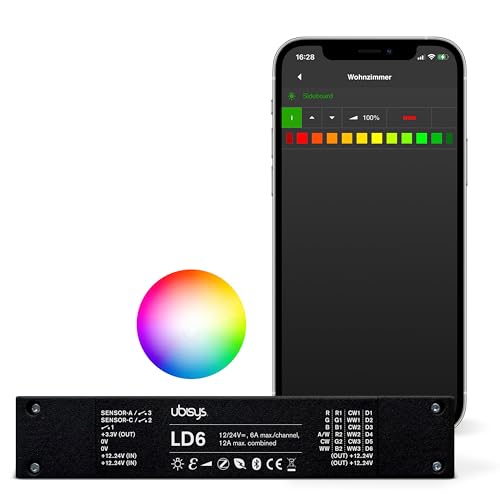
LD6Zigbee-Leuchte von Ubisys. Kompatibel mit Home Assistant über Zigbee2MQTT oder deCONZ.
Läuft mit
dCZ
Iluminize 511.050 Leuchte mit Farbsteuerung
511.050Zigbee-Leuchte mit Farbsteuerung von Iluminize. Kompatibel mit Home Assistant über Zigbee2MQTT.
Läuft mit
Lädt …