
The Aqara Light Switch H2 EU (Zigbee model lumi.switch.agl009) only works in a rudimentary way under Home Assistant’s ZHA integration: a switch entity, power and energy readings, and little else. No decoupled mode, no click events, no LED or power-on control. A custom quirk brings back the full feature set – without switching to Zigbee2MQTT. This guide walks you through it step by step; it was carried out and verified on six switches on 1 September 2026.
- Why the H2 only half-works under ZHA
- Requirements
- Step 1: Create the quirk folder and add it to the YAML
- Step 2: Install the quirk file
- Step 3: Restart and verify
- The new entities you get
- Enabling Decoupled Mode safely
- Using click events in automations
- Limits and pitfalls
- FAQ
Why the H2 only half-works under ZHA
Pair the H2 in ZHA and you get a switch entity, power, an energy meter, LQI/RSSI, Identify and firmware info – nothing more. For comparison: the exact same device is fully supported under Zigbee2MQTT. The reason shows up in the device diagnostics. Download them (Settings → Devices → the device → menu → “Download diagnostics”) and you will see:
"quirk_applied": false,
"quirk_class": "zigpy.device.Device"So no quirk applies at all – zigpy only parses the raw ZCL profile. The manufacturer-specific cluster 0xFCC0 is present on several endpoints, but its attribute list is empty. Yet that is exactly where decoupled mode, LED control, power-on behaviour, relay lock and multi-click live. On top of that, the multistate_input clusters stay silent, so no button-press events are generated. Without a matching quirk, ZHA simply cannot know these attributes. If you first want to sort out the fundamental differences between the two Zigbee paths, see our comparison Zigbee2MQTT vs. ZHA.
Requirements
- Home Assistant 2026.8 or newer (tested with 2026.8.3 on HA OS 18.2)
- An active ZHA integration (tested with
zha 2.1.0/zha-quirks 2.2.0) - Access to the
/configdirectory, e.g. via the “Advanced SSH & Web Terminal” or “File editor” add-on - The H2 EU as
lumi.switch.agl009(2 buttons/1 channel) – the quirk also coversagl010,agl004,agl005andagl006
The finished quirk comes from the still-open pull request zigpy/zha-device-handlers #4141 (“Add Aqara H2 switches (EU+US)”). Because it is not yet part of zha-quirks 2.2.0, we add it as a local custom quirk.
Matching device: Aqara Light Switch H2 EU
Exactly the model used in this guide: 2-in-1 (with/without neutral), 2 buttons / 1 channel, Thread & Matter, Zigbee model lumi.switch.agl009.
Affiliate link – buying through it supports netguide.io at no extra cost to you.
Step 1: Create the quirk folder and add it to the YAML
ZHA loads custom quirks from a directory you define in configuration.yaml:
zha:
  enable_quirks: true
custom_quirks_path: /config/zha_quirks/Mind the order: Home Assistant validates the path at startup with cv.isdir. If the folder does not exist yet, the config check fails. So create the /config/zha_quirks/ directory first and add the YAML afterwards. There is no field for this in the integration’s options dialog – it is YAML-only configuration.
Step 2: Install the quirk file
The most robust approach is to download the file pinned to a fixed commit – that way its contents will not change while the PR keeps evolving. In the HA terminal:
wget -O /config/zha_quirks/switch_h2.py \
  https://raw.githubusercontent.com/lonevvolf/zha-device-handlers/c06083b1d655c1787f5c0c2f56edd84b970328d4/zhaquirks/xiaomi/aqara/switch_h2.py

# verify integrity (optional but recommended)
sha256sum /config/zha_quirks/switch_h2.py
# fc846cbd24a37a51964196d999d46bc6516662d937227b9b1b2e1ed1410e017a  (19761 bytes, 575 lines)

ha core restartThe checksum matches commit c06083b from 27 August 2026. If it matches on your side, you have exactly the same file as in this guide.
Step 3: Restart and verify
After the restart, download the diagnostics for the same device again. It should now read:
"quirk_applied": true,
"quirk_class": "switch_h2:(Aqara / lumi.switch.agl009)"The system log shows the message zhaquirks: Loaded custom quirks. Please contribute them to … at WARNING level. This is not an error – it is a normal notice that a custom quirk is active.
The result is visible right on the device: instead of 7, each switch now exposes 13 entities. The new “Configuration” card looks like this:
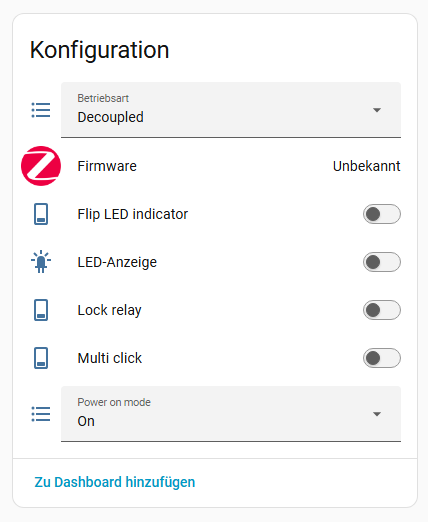
The new entities you get
| Entity | Type | Function |
|---|---|---|
| Operating mode | Select | Switch between Decoupled and Relay |
| Power on mode | Select | Behaviour after power returns: On, Previous, Off, Inverted |
| LED indicator | Switch | Turn the status LED on/off |
| Flip LED indicator | Switch | Invert the LED logic |
| Lock relay | Switch | Freeze the relay in its current state |
| Multi click | Switch | Enable multi-click detection |
The values are not just created but actually read from the device – in our test the operating mode came back as Relay and the power-on mode as Previous.
Enabling Decoupled Mode safely
In decoupled mode the rocker is decoupled from the relay: the physical switch no longer cuts power, it only reports the button press to Home Assistant. That is exactly what you want when smart bulbs sit behind the switch and need permanent power. So that the bulbs are never left without power, follow this order:
- First turn on the
switchentity (relay closed, the bulbs have constant power). - Then set the operating mode to
Decoupled(the rocker can no longer cut power). - Optionally enable
Lock relayso no accidental automation opens the relay either.
Important: In decoupled mode the light switch depends on Home Assistant being available. If HA is down, the rocker does nothing. If an ordinary (non-smart) lamp sits behind the switch, you do not need decoupled mode at all – the rocker then switches directly as usual.
Using click events in automations
The quirk makes the buttons fire the zha_event. The event command is composed of endpoint and press type. For the agl009:
- Button 1:
1_single,1_double,1_hold,1_release - Button 2:
4_single,4_double,4_hold,4_release
Because ZHA does not create event.* entities for these switches, you trigger on the zha_event directly. Use device_ieee instead of device_id – the IEEE address survives re-pairing the device. Branch via trigger IDs and choose:
alias: Kitchen – wall switch (decoupled)
triggers:
  - trigger: event
    event_type: zha_event
    event_data:
      device_ieee: "AA:BB:CC:DD:EE:FF:00:11"
      command: "1_single"
    id: toggle
  - trigger: event
    event_type: zha_event
    event_data:
      device_ieee: "AA:BB:CC:DD:EE:FF:00:11"
      command: "1_double"
    id: bright
conditions: []
actions:
  - choose:
      - conditions:
          - condition: trigger
            id: toggle
        sequence:
          - action: light.toggle
            target:
              entity_id: light.kitchen
      - conditions:
          - condition: trigger
            id: bright
        sequence:
          - action: light.turn_on
            target:
              entity_id: light.kitchen
            data:
              brightness_pct: 100
mode: queued
max: 10mode: queued is deliberate so that quick button sequences are not dropped. The quirk maps the press types as follows: 0 = hold, 1 = single, 2 = double, 3 = triple, 255 = release.
Limits and pitfalls
- No direct Zigbee binding to lamps. EP 1 only exposes Time and OTA as out-clusters – no OnOff client. So the switch sends no Zigbee switching commands; it reports presses as attribute reports. Zigbee “binding” and groups are therefore out; everything runs through Home Assistant automations.
- Writes can fail over Zigbee. The H2 report themselves as an
EndDevicewith “Battery or Unknown”, even though they are mains-powered. ZHA then treats them like sleeping devices at times, and a switch acknowledges withZIGBEE_DELIVERY_FAILED. Fix: press the rocker once to wake the device, then write again. - LED indicator may have no effect on EU variants. Testers report that LED control has no effect on EU models, while it works on US/AU. Decoupled mode and click events are unaffected.
- Delete the local copy after the merge. Custom quirks take precedence over built-in ones. Once the PR is merged and part of
zha-quirks, removeswitch_h2.pyfrom/config/zha_quirks/– otherwise the frozen file permanently overrides the maintained upstream quirk.
FAQ
What exactly is decoupled mode?
It decouples the physical rocker from the internal relay. The switch no longer cuts power itself; it only reports the button press – ideal for smart bulbs that need constant power.
Do I need the quirk with an ordinary lamp too?
No. If a regular, non-smart lamp sits behind the switch, the rocker works directly and reliably in the default mode (Relay) – even without Home Assistant. Decoupled mode only makes sense with smart bulbs.
What happens when the pull request is merged?
The quirk will eventually become a fixed part of zha-quirks. Delete your local switch_h2.py so the updated upstream version is used instead of your frozen copy.
Why doesn’t my LED indicator respond?
On EU variants several users report that LED control has no effect. This is known and affects neither decoupled mode nor the click events.
Can I bind the switch directly to a Zigbee lamp?
No. The switch lacks the required OnOff client cluster. You connect the button press to the lamp through a Home Assistant automation (see above).
Sources: Pull request #4141 (zha-device-handlers) · Device support request H2 EU · Zigbee2MQTT converter (attribute semantics). Note: the H2 EU dimmer (lumi.switch.agl011) is not covered by this quirk.